
All H7 (2026) cases will ship in Vista Mode, featuring a tempered glass top panel that carries the curved glass over the top of the case for an uninterrupted view of the PC. This is option is great for aesthetic-forward builders looking to show off their components from a new another angle.
Can you mount a radiator or fans at the top in Vista Mode?
When using Vista Mode, you cannot mount a radiator or fans at the top of the case. If you are looking to install a top-mount radiator or fans, you will first need to switch out the top glass panel for the steel mesh top and fan bracket.
How do I swap the top glass for the steel mesh?
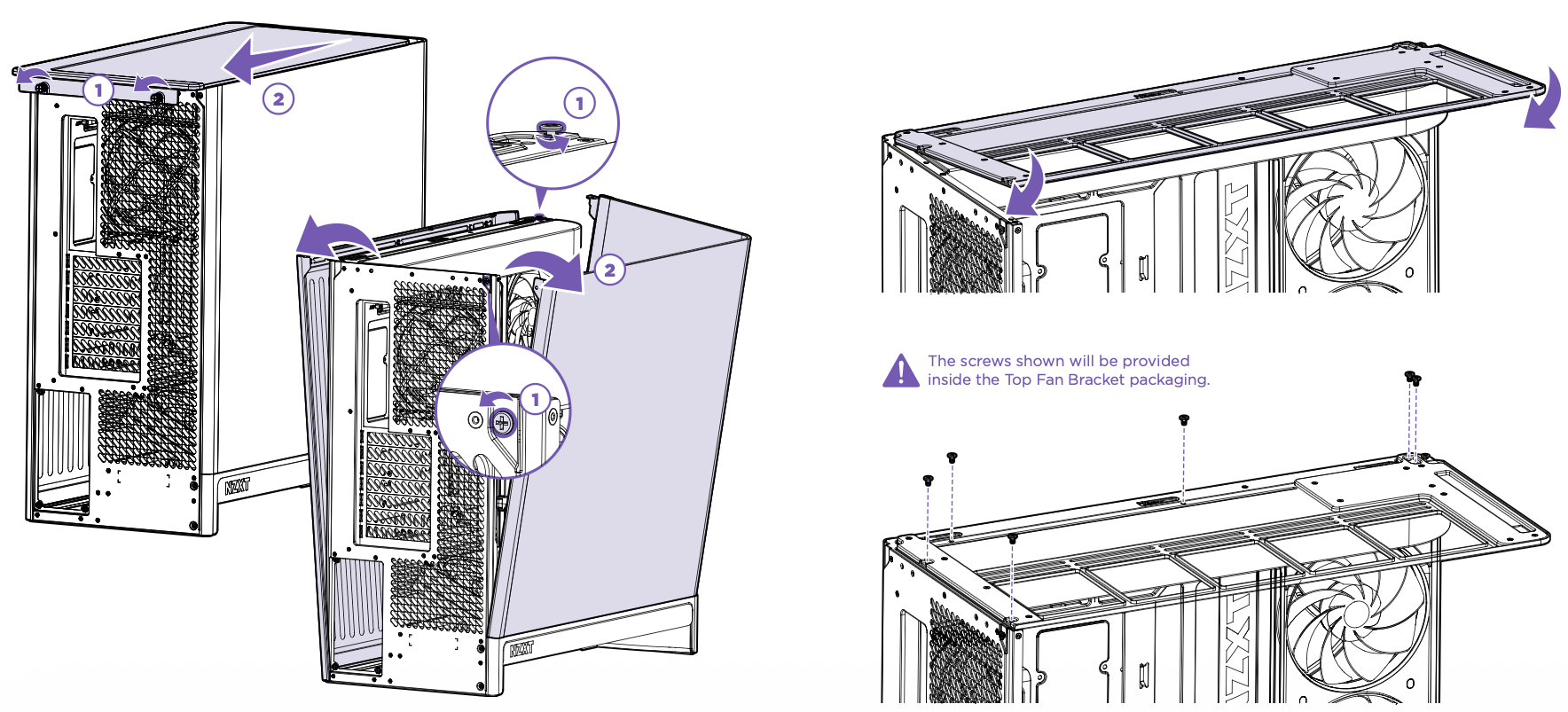 To swap from the top glass for the steel mesh, you will first need to remove the panels from the case.
Loosen the two thumbscrews at the top-back of the case
These are captive screws which will stay with the panel, do not attempt to remove the thumbscrews from the panel
Slide the top glass towards the back of the case, then lift to release.
Remove the right side mesh panel by pulling from the top of the panel outward to release the ball joints, then lift the panel.
If you have not removed the curved glass previously, remove the two shipping screws from the rear and top of the panel as shown above (1).
Angle the curved glass away from the top of the case, then left the panel.
Once the panels are removed, angle and secure the Top Fan Bracket to the top of the case, then secure the bracket with the included screws. The top mesh panel will secure to the case in the same way as the glass had previously.
Comments
0 comments
Article is closed for comments.